
MLQT – Modelica Library Quality Toolkit
MLQT is a git and SVN client that understands Modelica. It keeps formatting churn out of your commits, holds your library to a coding standard automatically — on the desktop and on your build server — and gives an AI agent a way to work inside your library properly. It is open source under the MIT licence.
Download MLQT | View on GitHub | Documentation
What your commits look like
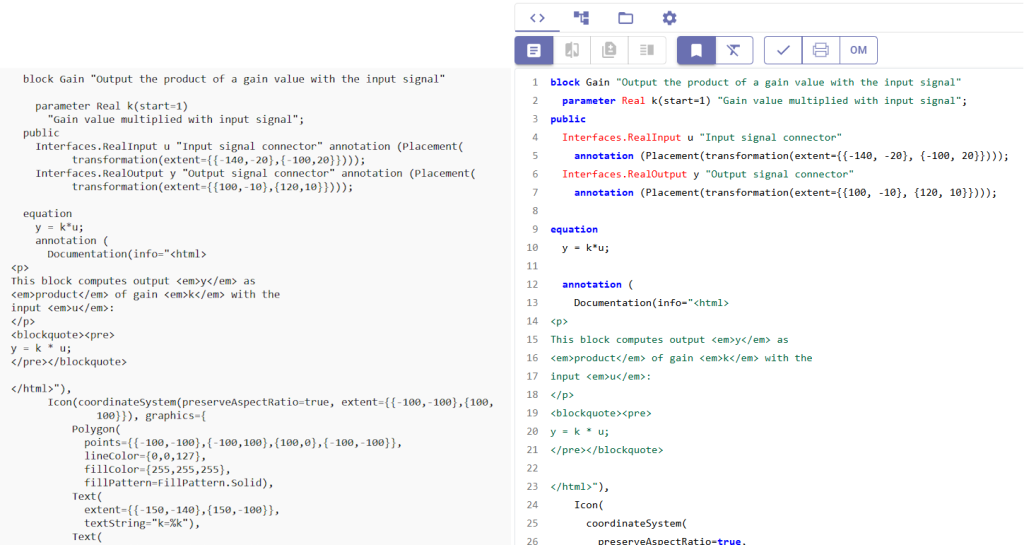
Every time a Modelica tool saves a file it rewrites the formatting: spacing around operators, the placement of annotations, the order of sections. Change one parameter and the diff that reaches your repository can be four hundred lines long, one of which is yours.
MLQT applies consistent formatting to every .mo file before it is committed, so the diff is the change. A reviewer reads five lines instead of five hundred, branches conflict on real edits rather than on whitespace, and blame points at the engineer who changed the equation rather than the last person who opened the file.
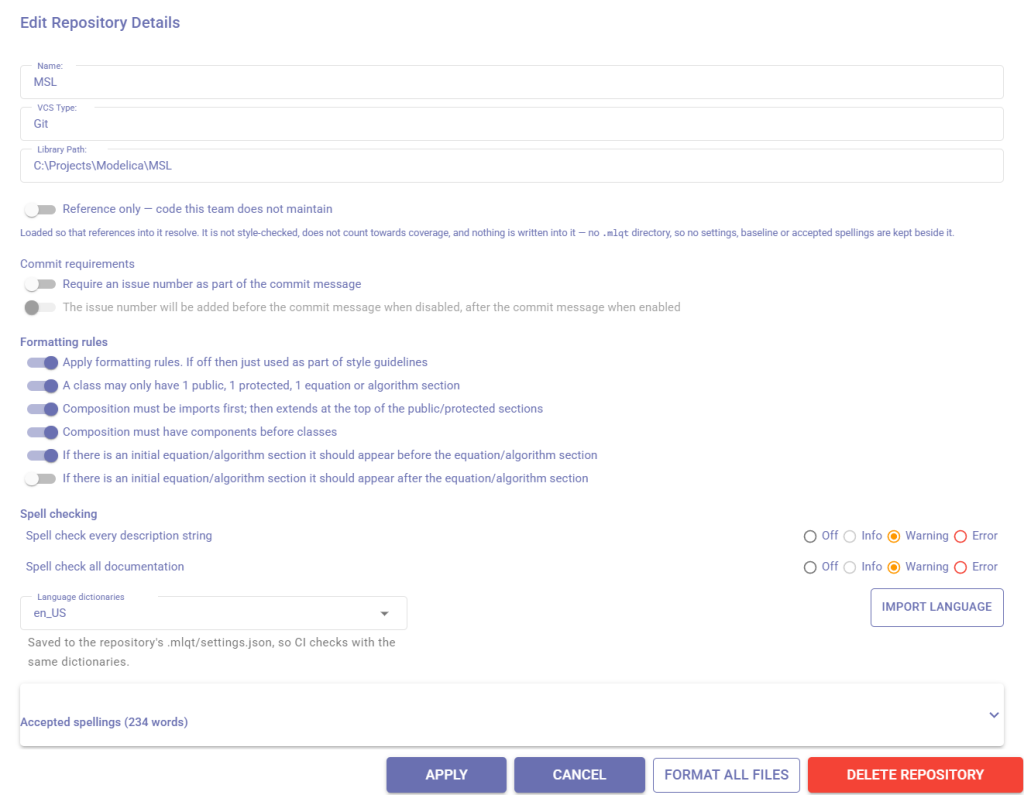
The formatting rules live in the repository, so everyone on the team — and the build server — applies exactly the same ones.
A Modelica-aware revision control client
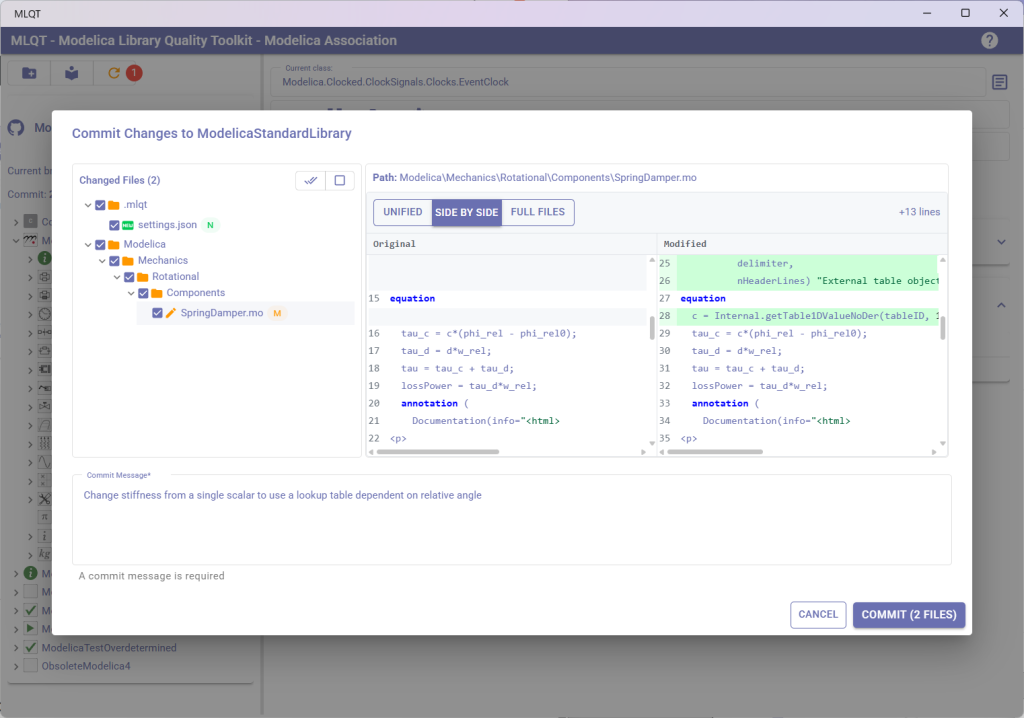
Generic Git and SVN clients know nothing about Modelica. MLQT replaces that generic client with one that understands the code it is committing, and gives you a full Git or SVN workflow — review pending changes, commit, pull updates, create and switch branches, merge, browse history.
Keep using the Modelica editor you already have. MLQT sits between your editor and your repository, so nothing about how you build models needs to change. Review diffs at file or model level, see the style findings for a model beside the code itself, and optionally send the model to Dymola or OpenModelica for a check before it goes in.
A standard that enforces itself
Most teams have a modelling standard written down somewhere. Very few have a way to check it, so it gets enforced only when a reviewer remembers. MLQT turns the standard into a rule set that runs against every model.
- Documentation — model descriptions,
Documentationinfo and revisions, icons, and descriptions on public parameters and constants - Naming conventions — consistent naming for classes, components and parameters, starting from a Modelica Standard preset you can adjust
- Structure — imports first, extends at the top, one of each section, initial sections in a consistent place, equations and algorithms kept apart
- Spelling — descriptions and documentation checked against a dictionary you extend with your own domain terminology
- Units —
Realvariables that declare no unit and inherit none from their type
Beyond house style, the same parser drives analysis that finds real defects: unused parameters, components and imports; classes nothing references; duplicate and shadowing declarations; uses annotations that disagree with what the library actually depends on; and package.order files that disagree with what is on disk.
Every rule can be switched on or off and given a severity, and the configuration is committed alongside the models it governs.
You don’t have to fix ten thousand findings first
Point the checks at a library that has been growing for a decade and you will get thousands of findings. Nobody is going to fix them all, and a tool that demands it gets uninstalled. MLQT records what it finds today as a baseline and commits it. Those findings become accepted debt and never fail a build. From then on, only findings that are not in the baseline fail — so the library cannot get worse, whatever state it starts in, and you burn down the existing debt at whatever pace suits you. When you’re ready to push harder, you can also fail on pre-existing findings in models a change has already touched.
Two details make it trustworthy in practice. A finding is identified by a fingerprint that survives reformatting, so reformatting a model never turns its accepted debt into new findings. And widening the baseline takes an explicit, reviewable step — your build server
only ever reads it.
The same checks on your build server
The mlqt command-line tool runs the same rules as the desktop application, headless. The exit code gates the build; the report format decides where findings appear.
mlqt check ./MyLibrary --baseline .mlqt/baseline.json --fail-on warning --format teamcity
TeamCity gets service messages and build statistics you can graph, so the debt trend draws itself across builds. GitHub gets SARIF for code-scanning alerts, or a pull request review with comments on the lines that earned them. Anything else gets a JUnit report and an exit code, which is all Jenkins, GitLab or Azure DevOps need.
The desktop application runs on Windows. The command-line tool also ships as a self-contained Linux binary, so the gate runs wherever your build agents already live. There is a Git pre-commit hook too, for catching things before they are ever pushed.
Impact analysis
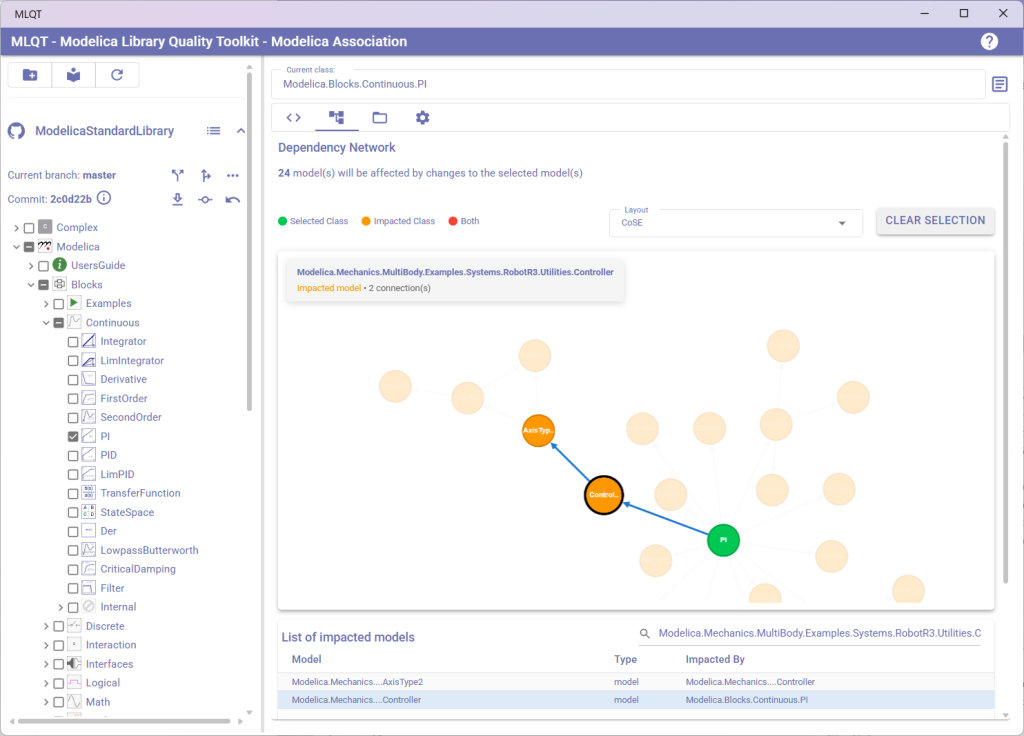
When you change a model, which other models are affected? In large libraries with hundreds of interconnected models, answering this question manually is impractical. MLQT’s impact analysis builds a dependency graph of your entire library and lets you visualize exactly how changes propagate.
Select any model to see an interactive network graph of its dependencies — both what it depends on and what depends on it. This makes code reviews more effective, helps you plan refactoring work, and prevents unexpected breakages from reaching your team. It also tells you what to re-test: a base class with a hundred and thirty dependents is a different kind of change from a leaf model.
External resources, and libraries you can’t read
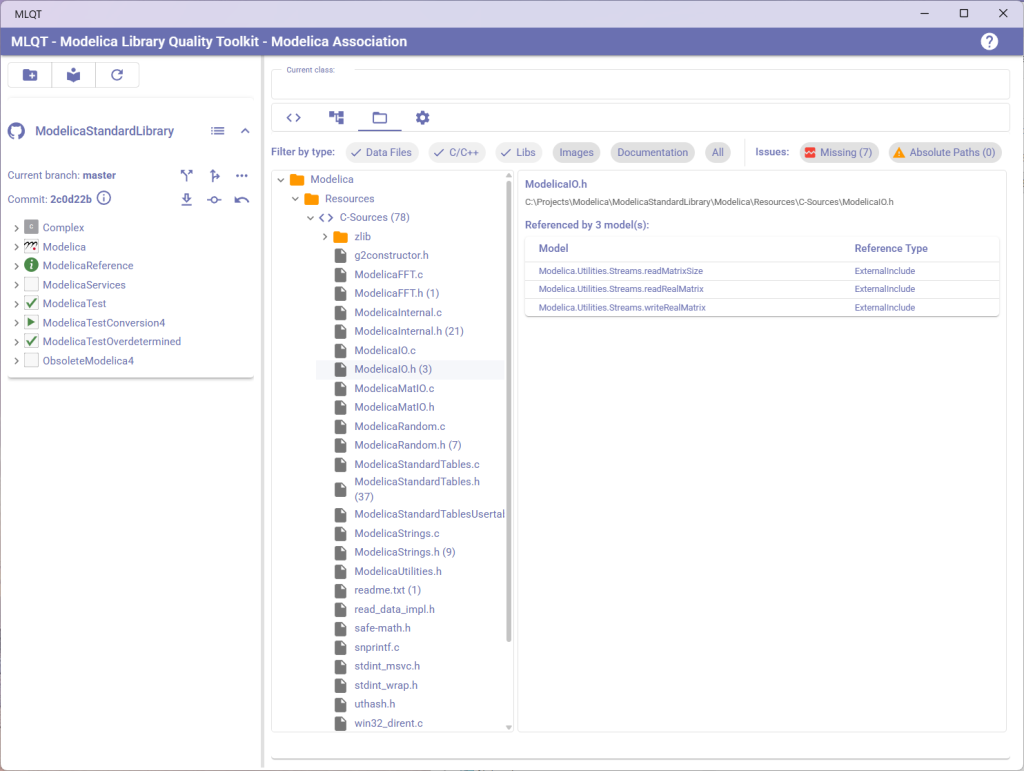
Modelica models often reference external files — data tables loaded with loadResource(), C source for external functions, images in documentation, and shared libraries. Keeping track of those and ensuring they stay valid as a library evolves is a problem MLQT solves automatically.
MLQT scans your models for every external resource reference, builds a resource map, and presents it as an organized tree. Filter by type, click any resource to see which models reference it, and find broken or orphaned references before someone else does on a fresh checkout.
Commercial libraries are a related problem. They ship as an unreadable package.moe, which normally means every reference into them looks like an error and every inherited icon disappears. MLQT recovers their class names, descriptions, base classes and icons from the vendor’s own generated documentation, so references resolve and the findings you are left with are real ones. Recovered classes are read-only and are never reported on — a vendor’s library is neither your achievement nor your debt.
Progress you can see
A list of findings is a poor way to measure progress: clearing two hundred out of nine thousand doesn’t feel like anything. MLQT reports coverage instead — what proportion of your classes have a description, documentation, an icon, described parameters, declared units — as a percentage with the underlying counts beside it.
Add one flag to the build and each commit that moves the numbers records a point, so the burndown builds itself. Reference and vendor libraries are measured for nothing, so what you are looking at is your own code
Built for AI agents as well as people
MLQT includes a Model Context Protocol server, so an AI agent such as Claude can read, author, check and format models in your library through the same parser the desktop application uses.
The difference that makes is in what the agent has to read. To learn the public interface of Modelica.Blocks.Continuous.Integrator, an agent would otherwise have to read the whole of Continuous.mo — close to 59,000 tokens. Through MLQT it asks for the interface and gets it in under 600. That is the difference between working with a real library and working with a toy one.
Over sixty tools cover searching, browsing, dependency analysis, style checking, formatting and editing. Edits are surgical rather than wholesale — add a component, set a modifier, add a connection — and every one is parse-checked with rollback and can be previewed first.
Everything the agent produces is ordinary Modelica source, checked against your rules and committed by you in the usual way.
Where it came from
MLQT began as an answer to a familiar problem: Modelica tools rewrite your files when they save them, flooding commits with formatting changes and drowning out the edits that actually matter. The original purpose was narrow — sit between the Modelica tool and the repository, and apply consistent formatting to every file before it was committed.
Getting that right meant writing a full Modelica parser rather than matching text, and that parser turned out to be the useful part. The same understanding of the language that drives the formatter also drives the style checks, the analyses, the dependency graph, the resource tracking and the MCP server. Everything on this page is built on it.
Get Started
The quickest way to judge MLQT is to run the checks against a library you already know well and read what comes back. Nothing is modified.
- Desktop application – Windows or Linux
- Command-line tool – Windows or Linux
- Version control – Git or SVN; the SVN client is bundled
- Model checking – optional; using Dymola or OpenModelica
- License – MIT, open source in full
Download MLQT | View on GitHub | Documentation
If you’d like a hand adopting it, or want the rule set tailored to your own modelling standard, get in touch.